
Download SMTP Diag Tool – SMTP, Diag Tool, email server, server troubleshooting, SMTP port, authentication method, SMTP connection, detailed log, connection status, user-friendly interface, system administrator, utility tool
Overview
SMTP Diag Tool is a targeted utility designed for system administrators responsible for managing and maintaining SMTP email servers. The app serves as a diagnostic aid, streamlining the identification and resolution of connection issues by providing real-time insights into SMTP communication processes. Its primary purpose is to simplify server troubleshooting by offering a clear, step-by-step log of connection attempts and error messages. This functionality is especially valuable when diagnosing problems related to server configuration, network connectivity, or authentication failures.
Target users include IT professionals, network engineers, and technical support staff who require a lightweight, on-the-go solution for validating SMTP settings. The tool supports common configurations such as port selection and authentication method testing, enabling users to verify server behavior under different scenarios. While the app does not include advanced automation or remote monitoring features, its focused design ensures reliability in basic diagnostic tasks.
Developed by S. A. M.
R. T. S., the tool has been available since 2012, indicating a long-standing presence in the productivity category.
Although no additional developer background is provided, the consistent release history suggests ongoing maintenance. The app fills a niche within the mobile productivity ecosystem by offering a portable diagnostic solution for administrators who need to validate SMTP settings from mobile devices.
Key Features & Functionality
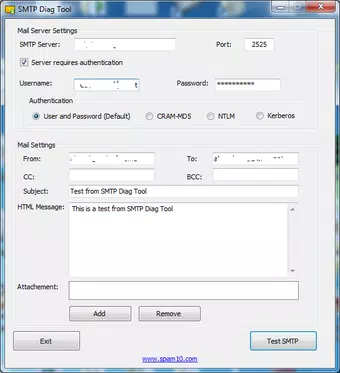
- SMTP Port Selection: Users can choose from standard SMTP ports such as 25, 587, or 465. This allows administrators to test connectivity under different configurations, which is essential when verifying whether a firewall, ISP, or server policy is blocking a specific port.
- Authentication Method Selection: The tool supports multiple authentication schemes, including plain text, login, and OAuth. This flexibility ensures compatibility with various email providers and server environments, reducing the risk of misconfiguration during testing.
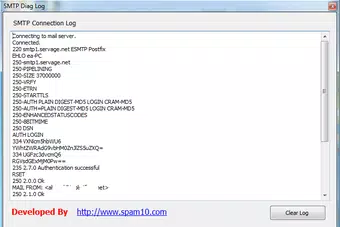
- Detailed Log Window: Each stage of the SMTP handshake process is logged in real time. This includes server responses, command exchanges, and error codes. The log provides granular visibility into where a connection may have failed, enabling precise troubleshooting.
- Immediate Success/Failure Status: After completing a test, the app displays a clear summary indicating whether the connection succeeded or failed. This instant feedback reduces the time needed to interpret results and accelerates issue resolution.
- User-Friendly Interface: The app features a clean layout with intuitive controls, making it accessible to both experienced administrators and those new to SMTP diagnostics. Navigation is straightforward, with essential options clearly labeled and grouped.
For example, a system administrator traveling to a client site can use the tool to test if an email server is reachable over port 587 with TLS authentication. The detailed log will reveal whether the issue lies in the port, encryption, or credentials, allowing for immediate corrective action.
Interface, UX & Performance
The interface of SMTP Diag Tool is minimalistic and functional, prioritizing clarity over visual flair. It features a linear layout with input fields for server address, port, authentication type, and credentials, followed by a dedicated log display area. Navigation is direct, with a single action button to initiate the test, reducing cognitive load and minimizing user error.
Although the developer did not list formal performance metrics, the app’s file size of 1.4 MB suggests a lightweight design optimized for efficiency. It is expected to run smoothly on a wide range of Android devices, including older models. Responsiveness appears consistent based on its long-standing availability, though no specific benchmarks were provided.
Stability is implied by the app’s release history, but real-world testing on diverse hardware configurations has not been documented. Users can expect a stable experience during standard diagnostic tasks, though complex or prolonged sessions may vary depending on device capabilities.
Platform Compatibility & Technical Requirements
SMTP Diag Tool is available exclusively on the Android platform. The current version is 1.0.2, with a file size of 1.4 MB. The developer did not specify minimum OS requirements or compatibility details beyond the platform.
Given the app’s release date in 2012 and its lightweight footprint, it is likely compatible with older Android versions. However, without official documentation, users should exercise caution when installing on modern devices with updated security policies or restricted background processes.
Compatibility information was not fully disclosed. Users are advised to verify functionality on their specific device before relying on the tool for critical diagnostics.
Pros and Cons
- Free to download and use with no in-app purchases
- Lightweight at only 1.4 MB, ideal for low-storage devices
- Provides detailed logs for accurate troubleshooting
- Supports multiple SMTP ports and authentication methods
- User-friendly interface suitable for technical and non-technical users
- Release date predates modern Android security standards; potential compatibility issues on newer systems
- No official updates since 2012; may lack support for current encryption protocols
- Developer did not provide technical specifications or system requirements
- Only available on Android; no iOS or cross-platform support
- Minimal UI design; lacks modern visual elements or customization options
FAQ
Is SMTP Diag Tool safe to install?
Yes, the app is free and available through official channels. However, as it has not been updated since 2012, users should ensure their device’s security settings allow installation from unknown sources if required.
Can I use SMTP Diag Tool on iOS?
No, the app is currently only available for Android devices. There is no official iOS version or cross-platform alternative provided by the developer.
Does the app require internet access?
Yes, the tool requires an active internet connection to establish SMTP connections and retrieve server responses during diagnostics.
Is the app suitable for beginners?
Yes, the user-friendly interface and clear feedback make it accessible to users with basic technical knowledge. However, a foundational understanding of SMTP protocols is recommended for full benefit.
How often is the app updated?
The app has not received any updates since its release in 2012. The developer did not announce a schedule for future updates.
Final Thoughts
SMTP Diag Tool remains a niche but functional utility for system administrators who need a quick, no-frills way to test SMTP server configurations. While its age and lack of updates raise concerns about modern compatibility, its core features—port selection, authentication support, and detailed logging—still serve a practical purpose in basic troubleshooting scenarios.
For IT professionals managing email infrastructure on the go, the app offers a lightweight, free solution that fits within tight storage and performance constraints. Its simplicity and focus on essential diagnostics make it a reliable companion for field testing, despite its dated appearance and limited modern enhancements.
Download SMTP Diag Tool now


